Showing posts with label Upgrade. Show all posts

Saturday, February 11, 2012

How to Install and Upgrade Oracle 11g Forms and Reports 11.1.1.2.0 on Microsoft Window 7 Professional

In this article I will describe "How to Install Oracle 11g  Forms and Reports 11.1.1.2.0 on Microsoft Window 7 Professional 32-bit" and then "How to Upgrade it to Oracle 11g  Forms and Reports 11.1.1.3.0".

Download Forms and Reports 11.1.1.2.0, its patch 11.1.1.3.0 and Oracle WebLogic Server 10.3.5 for Microsoft Windows 32-bit from oracle website .

First of all you need to install Oracle WebLogic Server. You can find its installation on Red Hat Linux here. You can easily install it on Windows.

Extract the installation files and run the setup from Disk1.

Figure - 1


Click Next button.


Figure - 2

Select "Install Software - Do Not Configure" option and click Next. Don't Configure at this stage because 11.1.1.2.0 has compatibility issues with WebLogic Server 10.3.5.


Figure - 3

Click Next button.


Figure - 4

Specify the Middleware home which is created during WebLogic Server Installation and click Next button.

Figure - 5


Uncheck the support checkbox and click Next button.
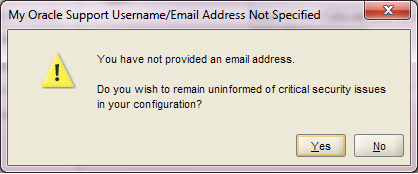

Figure - 6

Click Yes button.


Figure - 7

Click Install button.

Figure - 8

View progress.

Figure - 9

Click Next button.

Figure - 10

View summary and click Finish to finish installation of Oracle Forms and Reports 11.1.1.2.0. Extract the patch set 11.1.1.3.0 and run the setup.


Figure - 11

Click Next button.


Figure - 12

Specify the Middleware home which is created during WebLogic Server Installation and click Next button.

Figure - 13

Uncheck the support checkbox and click Next button.

Figure - 14

Click Yes button.

Figure - 15

Review the summary and click Install button.

Figure - 16

View progress.

Figure - 17

Click Next button.

Figure - 18

Review the summary and click Finish button to finish the installation of patch set 11.1.1.3.0. Select the "Configure Classic Instance" from "Start -> All Programs - > Oracle Classic 11g - Home1" Menu.


Figure - 19

Click Next button.

Figure - 20

Click Next button.

Figure - 21

Provide User Name and Password for new domain and click Next button.

Figure - 22

Uncheck the support checkbox and click Next button.

Figure - 23

Click Next button.

Figure - 24

Click Next button.

Figure - 25

Click Next button.

Figure - 26

Click Next button.

Figure - 27

Provide proxy information or you can disable it as well and click Next button.

Figure - 28

Click Next button.

Figure - 29

Review the summary information and click Configure button.

Figure - 30

View progress.

Figure - 31

View progress.

Figure - 32

Oracle Forms and Reports 11g 11.1.1.3.0 is configured successfully.

Insha-Allah this will help and serve the purpose. For any corrections and improvements please suggest.


Wednesday, December 21, 2011

How to Upgrade Oracle Enterprise Manager Grid Control Release 11.1.0.1 to Oracle Enterprise Manager Cloud Control Release 12.1.0.1

In the name of Allah, Most Gracious, Most Merciful.

In this article i will describe "How to upgrade Oracle Enterprise Manager Grid Control Release 11.1.0.1 to Oracle Enterprise Manager Cloud Control Release 12.1.0.1" on Red Hat Linux 5.3 OS. For this you have to download Oracle Enterprise Manager Cloud Control 12cR1 from oracle website http://www.oracle.com/technetwork/oem/grid-control/downloads/index.html

Pre-Upgrade Tasks
1. Apply patch 13434531 on OMS Home.
2. Using Upgrade Control select the upgrade approach.
3. Upgrade the Grid Control 11gR1 to Cloud Control 12cR1

Download the patch 13434531 from "My Oracle Support" and unzip it. Follow the instruction in README.txt to successfully apply the patch.
 
$ cd /u01/oracle/Middleware/agent11g/bin
$ ./emctl stop agent
$ cd /u01/oracle/Middleware/oms11g/bin
$ ./emctl stop oms
$ export ORACLE_HOME=/u01/oracle/Middleware/oms11g
$ cd /Uninstall/13434531
$ $ORACLE_HOME/OPatch/opatch apply

Figure - 1

$ cd /u01/oracle/Middleware/oms11g/bin
$ ./emctl start oms
$ cd /u01/oracle/Middleware/agent11g/bin
$ ./emctl start agent

Open the Grid Control in a browser and under Deployments tab select the upgrade control as shown in figure below

Figure - 2

Under "Select Upgrade type link" select "1-System" as in this case all the components on grid control is on one system.

Under "Preupgrade steps" click "Overview". On Overview page click Save and then Back

Under "Preupgrade steps" click Manager Software. Under "Provide Software Location" heading provide the plugins patch as shown in figure below.
 
Figure - 3
 
Now run the runInstaller of the Enterprise Manager 12c Software
Figure - 4
Un-check the check box and click Next button.

Figure - 5

Click Yes.

Figure - 6

Select "Skip" option and click Next.

Figure - 7

Click Next.

Figure - 8

Select "upgrade" option and "One System Upgrade". Select the grid control you want to upgrade and provide new Middleware home in the "Middleware Home Location" path. Click Next.

Figure - 9

Enter password for "SYS" and "SYSMAN" users for repository database.

Figure - 10

Copy the emkey to the repository as shown in the figure above and click "Next" again on the Figure - 9

Figure - 11

Click "Yes" on the above screen and "Next" on Figure - 9

Figure - 12

unlock and unexpire the ORACLE_OCM user and click OK on screen above and Next on Figure - 9


Figure - 13

Select all the plugins and click Next.

Figure - 14

Provide WebLogic username and password and click Next.

Figure - 16

Review the Summary and click Install.
 
Figure - 17

View Progress.

Figure - 18 

View Progress.

Figure - 19

View Progress.

Figure - 20

Open a terminal, login with root and execute above mentioned script

$ export ORACLE_HOME=/u01/oracle/Middleware/oms11g
$ su - root
$ /u01/oracle/Middleware12c/oms/allroot.sh

Figure - 21

Click Close and open the URL of Enterprise Manager Cloud Control in a browser.

Figure - 22

Provide SYSMAN and its password and lick Login.

Figure - 23

 Click "Select as my home" button under Summary section.

Figure - 24

Oracle Enterprise Manager Grid Control 11.1.0.1 is upgraded to Oracle Enterprise Manager Cloud Control 12.1.0.1

Insha-Allah this will help and serve the purpose. For any corrections and improvements please suggest.